Help
Questions & answers
How the shop works and how paying with Nitro Type Cash works.
What do you sell?
Custom backgrounds and UI themes for Nitro Type. Backgrounds change what's behind your races; UI themes restyle the interface around them.
How do I pay?
With Nitro Type Cash, the in-game currency. We don't accept real money.
How does buying work?
Pick a design in the shop and send the exact listed amount of Nitro Type Cash to our Nitro Type account. Once we've confirmed the payment, the item is unlocked for you.
Why does it have to be the exact amount?
That's how we match your payment to your order. If the amount is different, we can't tell which item it was for.
What does Nitro Type Shop plan on doing with all of the Nitro Type Cash?
Giving it right back to you. Every week, Nitro Type Shop runs raffles and giveaways worth upwards of 25,000,000 NT Cash for players who have a nitrotype.shop account and own at least one design.
That means every background or UI theme you pick up does double duty: your race screen looks incredible, and you're in the running for some seriously big cash prizes, week after week. Millions of NT Cash, going straight back to the people who make this shop what it is.
Want in? Make your account, grab a design you love from the Shop, and you're set for the next draw.
Do I need Nitro Type Gold?
To buy, yes: Nitro Type only lets Gold members send cash. Get Nitro Gold and you also get double cash, no ads, and Gold-only cars and loot. You don't need Gold to receive a gift. If you're claiming a gift without Gold and you're already friends with akaday, remove akaday as a friend on Nitro Type, then send a new friend request to verify.
How do I use what I bought?
- Install Tampermonkey, then the nitrotype.shop script.
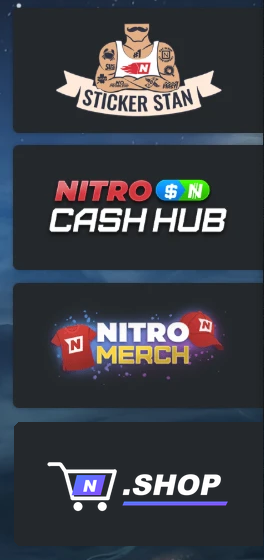
- On Nitro Type, open Shop and click .SHOP, the last tile on the left (under Nitro Merch).
- Go to Redeem Key and paste your key. Everything your Nitro Type account owns shows up in My Styles.
How do I redeem a key?
On Nitro Type, open Shop, click the .SHOP tile (last on the left), then Redeem Key. Paste the key from your purchase or gift and click Redeem. One key unlocks everything that Nitro Type account owns, and it only works on that account.
How do I change a theme's settings or turn it off?
Nitro Type's Shop → .SHOP → My Styles. Each background and UI theme has an On/Off button, and Settings lets you switch its effects (scenery, animations, cursor and more). The race typing area is never changed, so your own typing-box scripts keep working on or off. Changes are saved on that browser.
Where do I buy more, or send a gift?
Here in the shop, or from Nitro Type: Shop → .SHOP → Shop, where every item shows Buy or, if you own it, Gift.
I closed the checkout before saving my key. Is it gone?
No. Your key is tied to your Nitro Type account, not the window. On the same browser, click Buy on that item again and the key is still there. Anywhere else, go to Account, choose "Got a gift or lost your key?", and verify your Nitro Type account with a quick friend request. Then pick a password and everything you own is there.
Can I use my key on more than one computer?
Yes, on up to 3 of your own browsers. A key only ever works for the Nitro Type account it was bought for: log in to a different account and your themes don't load. Got a new computer? Reset your browsers on the Account page.
Can I use more than one theme at once?
One runs at a time by default, so they never clash: switch one on in .SHOP → My Styles and the others switch off. Want to mix them? Turn on Use multiple themes at once? at the top of My Styles.
How do updates work?
Automatically. Your backgrounds and UI themes download new versions in the background and apply on the next page load. Tampermonkey updates the .SHOP script itself about once a day, and .SHOP → Updates shows if a newer one is out and updates it in one click.
Does it work with the Nitro Type Mod Suite?
Yes. Themes never hide its buttons, its pages and switches take the theme's colors, and Startrack flags keep their own green, red and yellow. The race typing box is never changed, so your typing-box scripts keep working.
Can I share a theme with a friend?
Not the key or the code. Every copy is tied to the account that bought it, and sharing a key or a theme's code gets the key revoked and your nitrotype.shop account banned. To share, gift it instead: they get their own copy on their own account.
Can I buy the same thing twice?
For yourself, no: once it's yours, it's yours on every browser you use. You can gift it as many times as you like, to anyone who doesn't have it yet.
Can I gift a design to someone?
Yes. Sign in, click Buy, and choose "As a gift". You pay from your account and the design unlocks on theirs. They claim it on the Account page by verifying their Nitro Type account.
Where are my purchases?
On your Account page, on any device. Your account is created right after your first purchase, or make one any time on the Account page.
Can I make themes for the shop?
Yes. On the Shop page, click Suggest a design! next to All / Backgrounds / UI themes and send it in. If it's accepted, it's sold under your name and you get 30% of every sale.
Still need help?
Use the support form below (sign in first). Once it's sent, you'll see exactly where our reply will come from.
Is this an official Nitro Type site?
No. nitrotype.shop is fan-made and isn't affiliated with Nitro Type.
Support
Contact support
Pick what it's about, tell us what happened, and it goes straight to us. We reply on Discord or by email.
Sign in to contact support. Requests come from nitrotype.shop accounts, so we know who we're helping. No account? Make one in a minute by verifying your Nitro Type account with a friend request. Anyone can.
Sign in or create an accountSent. Thanks!
It went straight to us. We'll reply soon, usually within a day.
That's the only account we'll contact you from. If anyone else messages you claiming to be Nitro Type Shop, it's not us; it's a scam. Don't send them cash, keys or passwords.